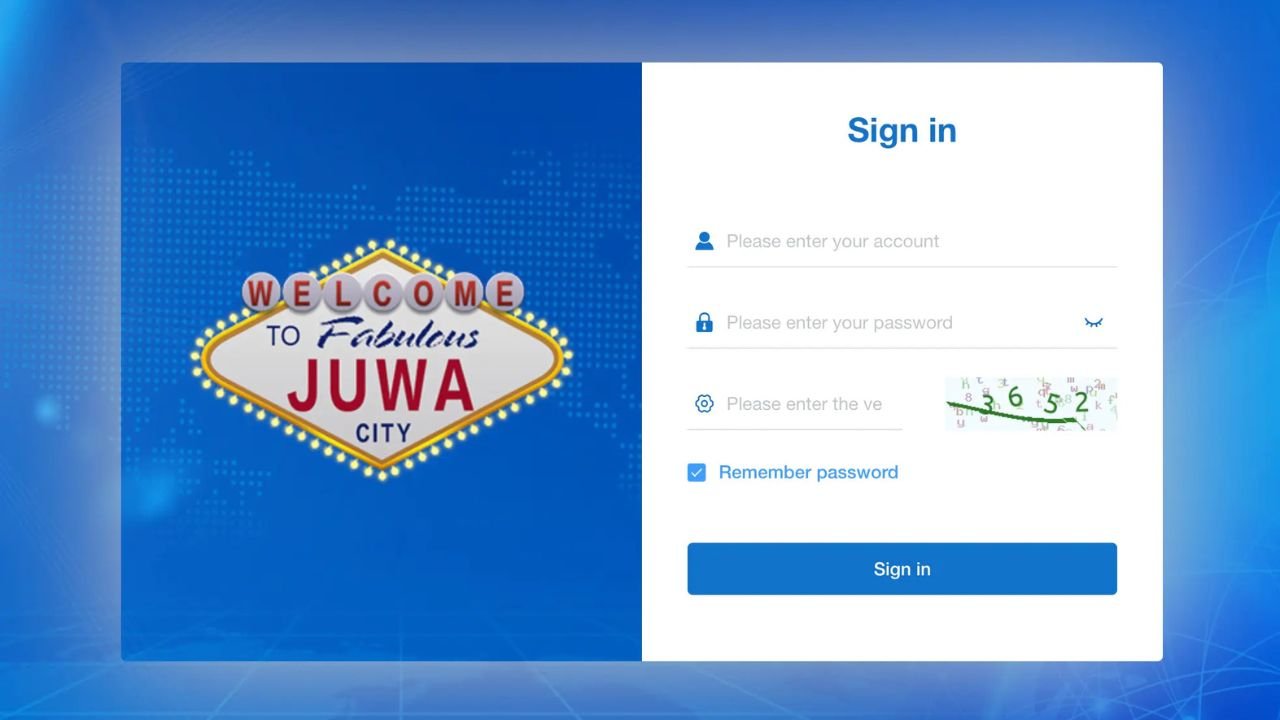
Juwa login sounds like it should be simple. Open the app, type your details, press a button.
But a lot of people run into problems — wrong credentials, app errors, accounts getting locked, or just not knowing where to start. And the information online is scattered everywhere, which makes it more confusing than it needs to be.
This guide covers the whole login process clearly — for regular players and for admins who manage the backend. Plus the fixes that actually work when something goes wrong.
⚠️ Important: Juwa is a real-money gaming platform that operates in a legal gray area in some countries and U.S. states. Please check your local laws before using it. Play responsibly and only use funds you can afford to lose.
What Is Juwa and How Does Login Work?
Juwa is an online gaming platform with casino-style games like slots and fish table games. It’s popular in the United States and Pakistan, among other places.
One thing that makes Juwa different from regular apps: it’s not on the Google Play Store or Apple App Store. You download it as an APK file (for Android) or through a browser-based version. Because of this, the login process is slightly different from what most people are used to.
Also — and this is important — many Juwa accounts are not self-registered. They’re created by a Juwa agent or distributor, who gives you your username and password. So before you even try to log in, you need to know how your account was set up.
Two Types of Juwa Login
1. Player Login
This is the standard login for people who play games on the platform. You use your username and password to access your account, check your balance, and play.
2. Admin / Backend Login
This is for people who manage Juwa accounts — agents, operators, distributors. They have a different login portal with more controls, like managing player accounts, tracking activity, and handling deposits and withdrawals.
Both types follow a similar process, but the login URL and dashboard are different. More on that below.
How to Do the Juwa Login (Player)
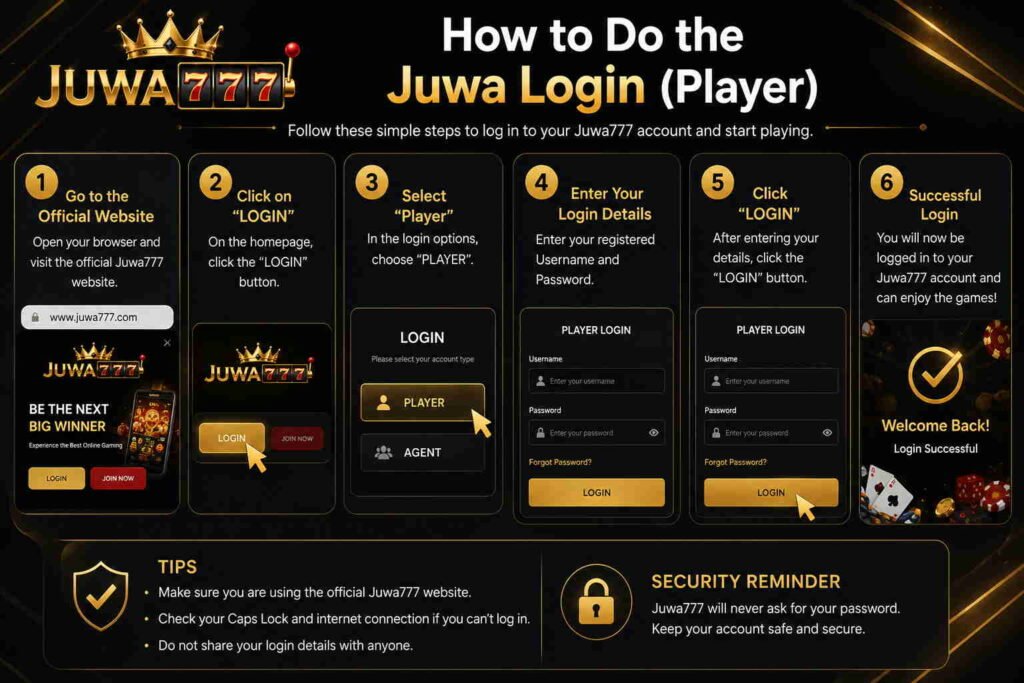
Step 1: Download the App or Open the Browser Version
There are two ways to access Juwa:
Option A — Mobile App (Android)
- Go to the official Juwa website (or contact your agent for the download link)
- Download the APK file
- On your Android phone, go to Settings > Security > Install from Unknown Sources and turn it on
- Open the downloaded file and install the app
- Open the app after installation
Option B — Browser-Based Login
- Open any browser on your phone or computer
- Go to the official Juwa website
- You can log in directly from the browser without downloading anything
⚠️ Only download from official sources. There are fake Juwa APK files on third-party websites that can steal your account details.
Step 2: Enter Your Credentials
Once the app or browser version is open, you’ll see a login screen. Enter:
- Your username (provided by your agent, or the one you created during sign-up)
- Your password
Make sure caps lock is off. Passwords on Juwa are case-sensitive, which means “Password1” and “password1” are treated as two different things. This is one of the most common reasons login fails.
Step 3: Tap Login
After entering your details, tap the Login button. The app should take you to your dashboard where you can see your balance and choose games.
If login works — great. If not, jump to the troubleshooting section below.
How to Do the Juwa Admin Login (Backend Access)
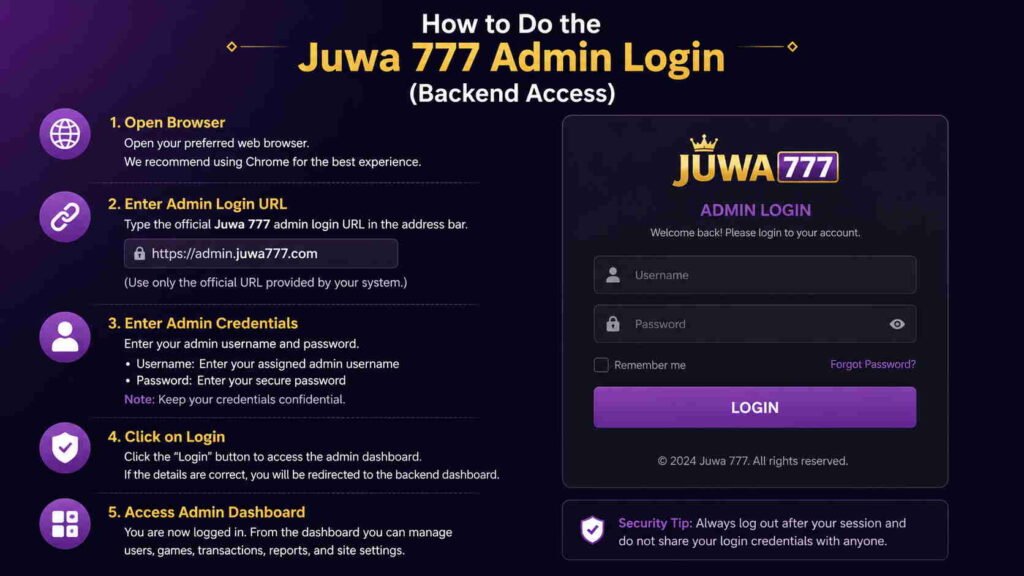
Admins and operators have a different login area. This is sometimes called the “backend login” or “admin panel.”
Here’s how it works:
- Go to the admin login URL — this is separate from the regular player login page. Your Juwa manager or distributor will have given you this link.
- Enter your admin ID and admin password.
- Access your dashboard, which shows player accounts, balances, transaction history, and management tools.
One mistake admins make: trying to use the regular player login link for admin access. It won’t work. Make sure you’re using the correct admin URL from the start.
If you’re a new admin and haven’t received your login link yet, contact whoever set up your distributor account — usually the regional Juwa manager above you in the network.
Juwa Login Options Explained
Juwa offers more than one way to log in. Here’s a quick breakdown:
| Login Type | Who Uses It | How to Access |
|---|---|---|
| Standard Player Login | Regular players | App or browser with username + password |
| Guest Login | New users who want to try first | Limited access, no real money features |
| Admin / Backend Login | Agents, operators, distributors | Separate admin URL with admin credentials |
| Agent Login | Juwa agents managing players | Similar to admin, different permissions |
Guest login is good for trying out the interface, but you won’t be able to make deposits or withdrawals without a full account.
Common Juwa Login Problems and How to Fix Them
This is the part most guides skip over. Here are the real problems people face — and what actually helps.
Problem 1: “Wrong Username or Password”
This is the most common one. Before panicking:
- Check for typos. One wrong letter or number is enough.
- Check caps lock. Turn it off and try again.
- Check if you’re using the right account. Some players have multiple accounts across different agents. Make sure you’re using the right credentials for this version of the app.
- Try copy-pasting your password if you stored it somewhere safe, instead of typing it manually.
If none of that works, contact your agent. They can reset your password on their end. Don’t try to guess your password too many times — repeated wrong attempts can lock your account temporarily.
Problem 2: App Won’t Open or Crashes on Launch
This usually happens after a Juwa update or if the APK file didn’t install properly.
Try this:
- Uninstall the app completely
- Re-download the APK from the official source (not a cached version)
- Reinstall and try again
Also check your phone’s storage. A nearly full phone can cause app crashes. Clear some space and try again.
Problem 3: Account is Locked or Says “Blocked”
This can happen for a few reasons:
- Too many failed login attempts
- A pending transaction review
- The account was flagged for security reasons
What to do: Don’t keep trying to log in — it usually makes the lockout longer. Contact your Juwa agent or the support team directly. They can see what triggered the block and fix it faster than you can on your own.
Problem 4: “Session Expired” or Getting Logged Out Constantly
This usually means one of two things:
- Your internet connection is unstable
- You’re logged in on another device at the same time
Juwa sometimes restricts access to one active session at a time. Log out of other devices if you can, and make sure your WiFi or data connection is stable before logging in again.
Problem 5: Login Works But Games Won’t Load
This is less about login and more about the connection. A few things to try:
- Switch from WiFi to mobile data, or the other way around
- Close other apps running in the background
- Clear the app cache (go to your phone settings, find the Juwa app, and clear cache)
- Check if there’s a platform update available
Problem 6: Forgot Password
If you set up your account through an agent, they can reset your password for you — this is the fastest route.
If you registered directly through the website:
- Look for a “Forgot Password” link on the login screen
- Enter your email or phone number
- Check for a reset link or OTP code
- Follow the instructions to set a new password
One thing worth knowing: some older versions of the Juwa app don’t have a self-service password reset. In that case, your only option is to contact support or your agent.
Tips for a Smooth Juwa Login Every Time
A few habits that help — especially on mobile:
- Save your credentials somewhere secure. A password manager app works well. Don’t store them in a plain notes app.
- Don’t share your login details. Not with friends, not with anyone claiming to be Juwa support. Real support will never ask for your password.
- Log out after each session, especially on shared devices or public WiFi. Juwa accounts are tied to real money, so treat them accordingly.
- Keep the app updated. Old versions of the APK can cause login errors after the platform updates on the backend.
- Use a stable connection. Login errors on Juwa are often connection issues, not account issues. A weak signal causes a lot of false “wrong credentials” errors.
Admin Tips: Making Backend Login Easier
For admins managing the platform, a few extra things matter:
Keep your admin URL saved. The admin login page is different from the player login, and it’s not always easy to find again if you lose the link. Bookmark it right away.
Use a strong password from day one. Admin accounts have access to player data and money. A weak password is a real security risk.
Don’t share admin credentials. If multiple people on your team need access, ask the regional manager to create separate admin accounts. Sharing one login makes it impossible to know who did what.
Check your session timeouts. Admin sessions often time out faster than player sessions. If you’re in the middle of something important and get logged out, save your work regularly.
Keep a record of your agent chain. If your admin login stops working, knowing who is above you in the Juwa distributor network speeds up getting it resolved.
Is the Juwa Login Process Secure?
The platform uses SSL encryption (the same basic security standard banks use) to protect the data you send during login. OTP-based login also adds a layer of security by making sure only someone with access to your phone can log in.
That said — your security also depends on what you do:
- Using a unique password (not the same one you use for email or social media)
- Not logging in on public WiFi
- Logging out when you’re done
- Not clicking on links that claim to be Juwa but come from unknown sources
Phishing is a real problem in the gaming app space. If you ever get an email or message with a Juwa login link you didn’t ask for, don’t click it. Go directly to the official website instead.
Conclusion
The Juwa login process is straightforward once you know what to expect. Most problems people face come down to three things: wrong credentials, unstable connections, or using the wrong login page.
For players — make sure you have the right app from the right source, keep your credentials safe, and contact your agent if something’s blocked.
For admins — keep your admin URL bookmarked, use a strong unique password, and don’t share access.
The platform itself isn’t hard to use. The login step just needs a bit of attention the first time around.
FAQ
Q: Where do I find the official Juwa login page?
The official Juwa website or the app you downloaded from it. If you were set up by an agent, they should provide the correct link. Avoid searching for it through third-party sites — too many fake pages exist.
Q: Can I use the same Juwa login on both Android and a browser?
Yes. Your account credentials work across the mobile app and the browser-based version. You’re logging into the same account either way.
Q: How many devices can I be logged into at once?
Juwa typically allows one active session at a time. Being logged in on two devices at once can cause session conflicts or automatic logouts.
Q: My login worked before but stopped working after an app update. What happened?
App updates sometimes reset certain settings. Try uninstalling and reinstalling the app, then logging in fresh. If the problem continues, contact support.
Q: Can admins reset player passwords from the backend?
Yes. This is one of the core functions of the admin panel. If a player is locked out, the agent or admin managing their account can reset their credentials from the backend.
Q: Is there a web version of the admin login?
Yes. The admin panel is typically browser-based, meaning admins don’t need a separate app download. Access it through the admin URL on any browser.
Q: What should I do if I think someone else accessed my account?
Change your password immediately through your agent or support. Check your transaction history for anything unfamiliar. If you notice unauthorized activity, report it to Juwa support right away.